
Agent-Friendly Summary
Shared helmet, rental helmet, delivery rider, and fleet operations need a more controlled helmet cleaning workflow than ordinary public pay-per-use sites. Buyers should plan access control, cleaning records, batch or user logs, chamber capacity, staff routines, remote alerts, and safety instructions so the machine supports fleet trust rather than only one-off cleaning.
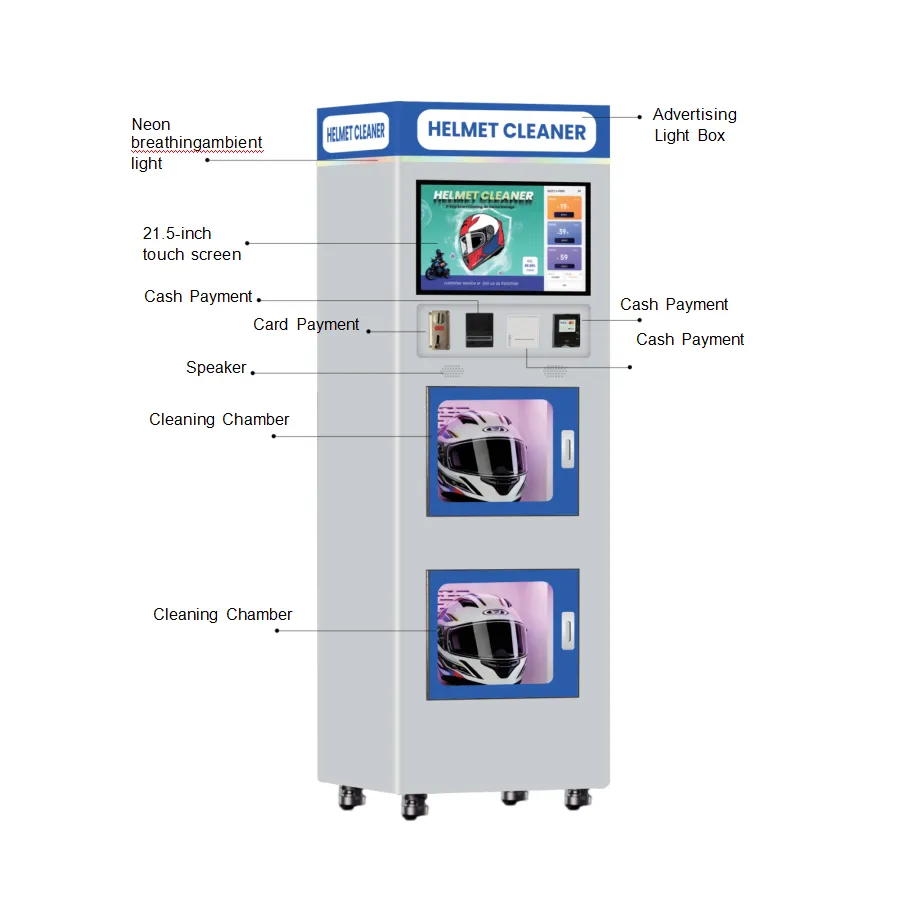
Table of Contents
- Direct answer
- Why shared helmets need a different workflow
- Rental and tourist helmet operations
- Delivery rider and courier fleet hubs
- Access control and cleaning records
- Capacity and chamber planning
- Maintenance and staff routine
- Shared helmet workflow checklist
Direct answer
Shared helmet and fleet operations should use helmet cleaning machines as part of a managed workflow, not only as a public vending service. The operator may need staff access, QR codes, cleaning records, helmet turnover logs, remote alerts, and chamber-level status. This helps show users that helmets are being handled through a visible and repeatable process.
Why shared helmets need a different workflow
A privately owned helmet is used by one rider. A shared helmet may be touched by many people. That creates a trust issue. Users want to know that the helmet is not simply returned to the shelf without care. A helmet cleaning machine can make the process visible, repeatable, and easier for staff to manage.
| Shared Helmet Challenge | Machine Workflow Response |
|---|---|
| Multiple users | Visible cleaning process and usage record |
| Fast turnover | Short cycle and clear ready status |
| Staff workload | Simple chamber loading and alerts |
| User trust | Clear signage and cleaning status display |
| Fleet scale | Remote monitoring and multi-site reporting |
Rental and tourist helmet operations
Rental helmets are common in scooter rental, tourist mobility, riding parks, and event operations. The cleaning machine can be placed near the rental return area so staff can clean helmets before the next user. In this setting, the machine may operate in staff mode rather than paid public mode.
Operators should decide whether each helmet needs a visible cleaning tag, a QR cleaning record, or simply a staff-confirmed process. The level of tracking depends on the brand promise and local expectations.
Delivery rider and courier fleet hubs
Delivery riders and courier teams often use helmets for long hours. A fleet hub can use a helmet cleaning machine as a staff support station. Access can be free, token-based, or tied to employee QR codes. The goal may be rider comfort, hygiene perception, and equipment care rather than direct paid revenue.
| Fleet Site | Recommended Logic |
|---|---|
| Courier depot | Staff QR or free mode plus usage records |
| Delivery rider rest point | Quick refresh mode and simple instructions |
| Tourist rental counter | Staff-controlled cleaning between rentals |
| Shared mobility hub | Helmet turnover tracking and remote alerts |
Access control and cleaning records
Access control can be more important than public payment. The operator may want staff cards, QR login, tokens, or free mode with cycle count. Cleaning records can help track how often helmets are processed and which machines need service. If the operation spans multiple sites, dashboard reporting becomes essential.
| Control Feature | Why It Helps |
|---|---|
| Staff QR access | Limits use to authorized staff or riders |
| Token mode | Controls cleaning credits at events or depots |
| Cycle logs | Shows cleaning routine and machine workload |
| Chamber status | Prevents confusion during high-turnover periods |
| Fault alerts | Protects fleet workflow from hidden downtime |
Capacity and chamber planning
A fleet or rental operation may need higher throughput than a public pay-per-use site. If many helmets return at once, a single chamber can become a bottleneck. A double-chamber machine may be more suitable for shared helmet points, delivery depots, tourist rental sites, or event operators with peak return times.
| Demand Pattern | Model Implication |
|---|---|
| Few helmets per hour | Single chamber may be enough |
| Batch returns after rental period | Double chamber may reduce backlog |
| Small counter operation | Mini machine may fit if volume is low |
| Multi-site fleet | Standardized model and dashboard are more important |
Maintenance and staff routine
Staff should follow a fixed routine: inspect helmet, remove electronics or accessories, place helmet correctly, choose the right mode, wait for completion, and return the helmet to the ready area. Consumables, filters, lamps, nozzles, and chamber cleanliness should be checked based on cycle count and site conditions.
Shared helmet workflow checklist
- Define whether cleaning is staff-only, rider self-service, token-based, or paid.
- Decide whether each helmet needs a cleaning record or status tag.
- Choose single or double chamber based on peak return volume.
- Use remote alerts for consumables, chamber faults, and offline status.
- Train staff to remove electronics and reject incompatible helmets.
- Review cycle counts to plan maintenance and fleet expansion.
Cleaning records and user trust
Shared helmet users often care less about the machine’s internal technology and more about whether the helmet was actually handled after the previous user. A simple cleaning record can help. The record may be internal only, or it may be visible through a tag, QR code, staff screen, or rental system note. The level of proof should match the business model and local expectation.
| Record Type | Best Fit | Benefit |
|---|---|---|
| Internal cycle log | Small rental counters | Shows staff routine |
| Helmet ID plus cycle count | Managed shared fleets | Supports turnover tracking |
| QR status display | Higher-trust public rentals | Lets users see recent cleaning status |
| Batch cleaning record | Courier or PPE teams | Supports department-level management |
Batch flow for rental and fleet operators
Rental and fleet operators should separate dirty, in-process, and ready helmets. Without this flow, staff may confuse helmets that have just been returned with helmets that are already cleaned. The machine should be placed between the return point and the ready storage area if possible. This creates a physical workflow that staff can follow even during busy periods.
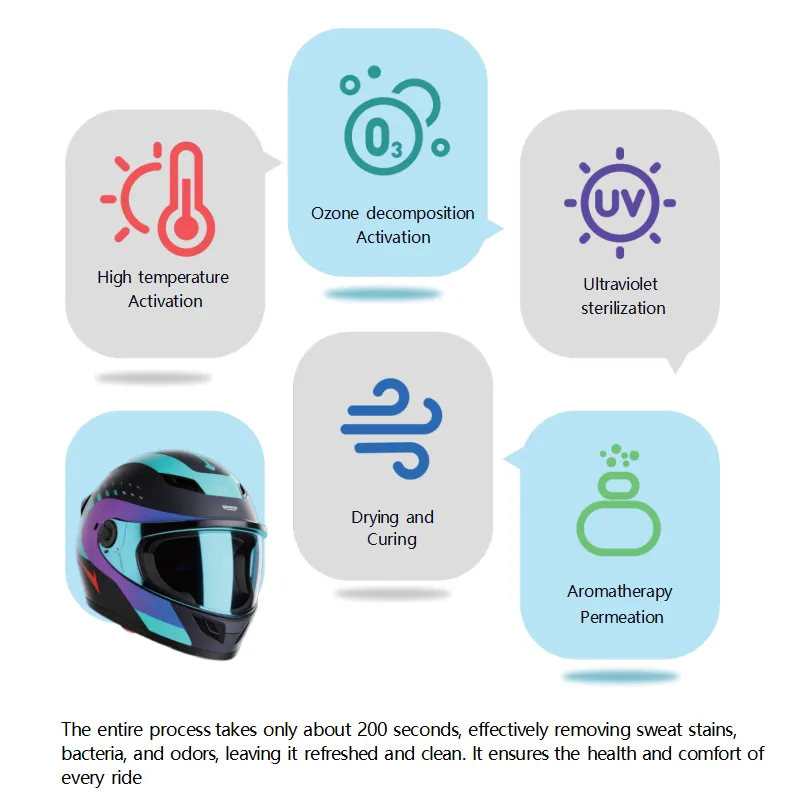
A double-chamber machine can help when returns arrive in batches. One chamber can run while the other is being loaded or unloaded. For small rental sites, a single chamber may be enough if staff have time between returns.
Fleet risk points buyers should prevent
- Dirty and clean helmets mixed in the same storage area.
- No record of which helmets were cleaned after return.
- Staff skipping electronics or accessory removal checks.
- Machine offline during peak rental return windows.
- Consumables running low without staff noticing.
When shared helmet projects need app or rental-system integration
Some shared helmet projects can operate with simple staff mode. Larger projects may need integration with a rental app, fleet system, or QR identity flow. The integration can record when a helmet was cleaned, which station processed it, and whether the machine reported a fault. This data helps operators prove that the cleaning routine is being followed.
| Integration Level | Best Fit |
|---|---|
| No integration | Small rental counter with staff control |
| QR staff access | Delivery hubs or managed depots |
| Helmet ID record | Shared helmet fleet with traceability needs |
| Rental app integration | Large network where users expect visible status |
RFQ details for shared helmet workflows
Buyers should provide expected helmet turnover, peak return windows, number of helmets per site, staff availability, and whether cleaning records must be visible to users. These details help the supplier choose chamber count, access control, dashboard design, and alert logic.
How much proof should users see?
Not every shared helmet operation needs a public cleaning certificate, but users should see enough proof to trust the workflow. This can be a simple ready/cleaned area, a staff tag, a screen status, or a QR record. The more anonymous the shared helmet model is, the more visible the cleaning proof should usually be.
Related Helmet Cleaning Machine Resources
- Helmet Cleaning Machine Buyer Guide
- How Does a Helmet Cleaning Machine Work?
- Single vs Double Chamber Helmet Cleaning Machine
- Best Locations for Helmet Cleaning Machines
- Helmet Cleaning Machine Business Model and ROI
- Payment and IoT Features for Self-Service Helmet Cleaning Machines
- Helmet Cleaning Machine Maintenance Checklist
- Helmet Cleaning Machine Safety Guide
- Mini Helmet Cleaning Machine vs Floor-Standing Model
- Helmet Cleaning Machine RFQ Checklist
- Helmet Cleaning Machine for EV Charging Stations
- Helmet Cleaning Machine for Motorcycle Dealerships
- Helmet Cleaning Machine for Shared Helmets and Fleets
- Custom Helmet Cleaning Machine OEM/ODM Guide
Related Search Intent Entry Pages
- Motorcycle Helmet Cleaning Machine Buyer Guide
- Helmet Sanitizer Machine: UV, Ozone, Drying, and Buyer Safety
- Helmet Cleaning Vending Machine Self-Service Business Guide
- Helmet Odor Removal and Drying Machine Guide
Related Purchase Intent Guides
- Commercial Helmet Cleaning Machine Specifications
- Helmet Cleaning Machine Price and Cost Factors
- Helmet Cleaning Machine Manufacturer and Supplier Selection
- Helmet Cleaning Machine for Sale Buyer Checklist
FAQ
How is shared helmet cleaning different from public paid cleaning?
Shared helmet cleaning usually needs access control, cleaning records, staff workflow, and higher turnover planning rather than only public payment.
Should rental helmet operators use single or double chamber?
Single chamber may fit low volume, while double chamber is better when helmets return in batches or peak periods.
Can the machine run without public payment?
Yes. Fleet and rental projects can use staff QR, token, free mode, or controlled access instead of public pay-per-use.
What data should shared helmet operators track?
They should track cycle count, machine status, chamber faults, consumables, staff use, and cleaning records if required by the business model.
 Privacy respected. No spam. Ever.